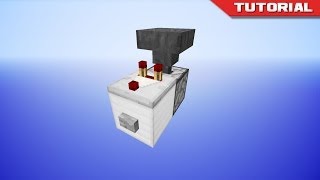
Video: Minecraft Java - Monostable Circuits - Redstone Guide by Roho The Cat
How to build it
- Design 1: Place the Input & Piston
For the 1-Tick Monostable Circuit, place a solid building block on the ground with a button on top. Next to it, place a piece of redstone dust leading into an upward-facing sticky piston planted one block lower in the ground.
- Design 1: Add the Block & Repeater
Place a solid building block directly on top of the sticky piston head. On the far side of that block (opposite the redstone dust), place a redstone repeater facing outward left on its default 1-tick delay.
- Design 2: Place the Dropper & Hopper
For the Dropper-Hopper Monostable Circuit, place a dropper facing straight up with a button attached to it (or on an adjacent block powering it). Crouch and place a hopper directly on top of the dropper so its spout points straight down into the dropper.
- Design 2: Insert Item & Comparator Output
Place a single random item inside the dropper. Next to the top hopper, place a redstone comparator facing away from the hopper, followed by a redstone repeater in front of the comparator to boost the signal to full strength.
- Design 3: Place the Torch Input
For the Silent Monostable Circuit (rising edge), place a solid block with a button on it, and attach a redstone torch to the output side of that block.
- Design 3: Arrange the Repeaters & Dust
From the redstone torch, wire two parallel paths side-by-side using redstone repeaters, placing a third repeater in the corner to delay and lock one path against the other, and fill the remaining connecting spaces with redstone dust.
- Design 3: Convert to Falling Edge (Optional)
If you want the silent circuit to trigger when the button pops back out (falling edge) instead of when it is pressed in, simply break the redstone torch and replace it with a piece of redstone dust.
How it works
Every monostable circuit has only one stable state (OFF). When triggered, it briefly enters an unstable ON state before immediately cutting itself off:
- 1-Tick Piston Circuit: When you press the button, the redstone dust powers both the solid block and the sticky piston beneath it. The repeater pulls power through the block for 1 redstone tick before the piston finishes pushing the block upward, breaking the connection and ending the pulse.
- Dropper-Hopper Circuit: Pressing the button fires the upward dropper, shooting the single item into the hopper above. The comparator detects the item inside the hopper and outputs a brief pulse through the repeater before the hopper immediately pushes the item back down into the dropper.
- Silent Circuit: By splitting the signal into two repeater lines with different delays (or using repeater locking), the signal racing through the faster line briefly passes through before the delayed line cuts it off. With a redstone torch at the start, it acts as a rising-edge detector (pulses when pressed); with redstone dust instead of a torch, it acts as a falling-edge detector (pulses when the button releases).
Tips & variations
- Slime-Free Piston Alternative: In the first design, if you do not have a slimeball for a sticky piston, you can use a regular piston instead—just replace the solid block on top of it with a gravity block like sand, gravel, or concrete powder so it falls back down on its own.
- Java Edition 1-Tick Behavior: A 1-tick pulse generated by Design 1 will cause sticky pistons in Java Edition to "spit out" their blocks on one press and retract them on the next, making it a simple T Flip-Flop.
- Silent Builds: Use Design 2 or Design 3 whenever you want to avoid the loud mechanical noise of a piston extending and retracting in your base.