
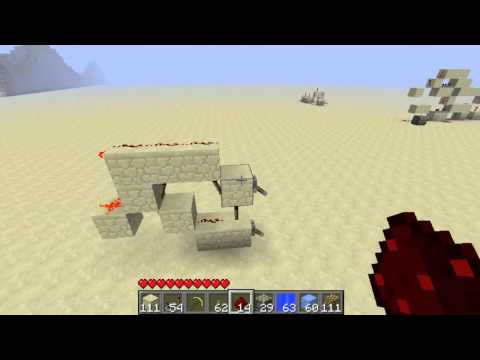
Video: 1 Wide - D-Flipflop by James “jt” Tumber
How to build it
- Set Up the 1-Wide Frame
Clear a 1-block-wide vertical strip for your circuit. If you plan to build a multi-bit memory bank, leave a 1-block air gap between each slice so adjacent redstone dust lines do not connect.
- Place the Data (D) and Control (C) Inputs
Attach two levers on the front of the 1-wide frame at different heights. The upper lever acts as your Data (D) input, while the lower lever serves as your Control or Clock (C) lock.
- Wire the Gating and Latch Logic
Following the classic 1-wide wiki layout, arrange your redstone torches, dust, and repeaters vertically between the two inputs so that the C input gates the D line and feeds into a self-holding latch at the back.
- Connect the Output Line (Q)
Run your output redstone line (Q) from the final stage of the latch at the back of the slice. Place a redstone lamp, piston, or dust line at the output so you can easily read the stored state.
- Test Writing and Locking Data
Toggle the C lever to the unlocked position and flip the D lever on and off to verify the output follows it. Then flip the C lever to the locked position and toggle D again to confirm the output stays frozen.
How it works
A D flip-flop operates using two inputs—D (Data) and C (Control/Clock)—and one output, Q:
- Unlocked State (Write Mode): When the C input is toggled to the open state, the internal gating logic allows the signal from lever D to pass straight through to output Q. Flipping D on turns Q on; flipping D off turns Q off.
- Locked State (Hold Mode): When you flip the C lever to the locked state, it blocks any changes from the D input and locks the internal memory latch. Even if you continuously toggle the D lever on and off, output Q remains stuck in whatever state (on or off) it held at the exact moment C was locked.
This makes it ideal for shared data buses: you can send a stream of signals into the D input of several flip-flops at once, and only the row with an unlocked C line will overwrite its stored value.
Tips & variations
- Building Memory Arrays: Place multiple 1-wide D flip-flops side by side with a 1-block gap between each slice to prevent redstone dust crosstalk.
- Shared Data Bus: You can run a single data line across all D inputs simultaneously and use repeaters on individual C lines to select which specific memory cell opens up to record the data.
- Modern Alternative: In later versions of Minecraft, you can also create an ultra-compact D flip-flop simply by running one redstone repeater into the side of another repeater (repeater locking), where the back repeater is D and the side repeater is C.


