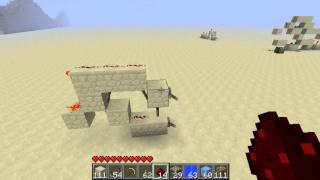
Video: Minecraft Logic Gates 12 - Piston D-Flip-Flop (BUD) [Tutorial] by Sw1Ftx16
How to build it
- Place the Base and Sticky Piston
Start by placing two solid blocks to align your build, then attach a sticky piston to them. Once the sticky piston is positioned, break the temporary alignment block and place a piece of redstone dust in that space.
- Add the Movable Block and Output Torch
Attach a solid block directly onto the face of the sticky piston. Leave a one-block gap out from the piston assembly and place a solid block with a redstone torch attached to it to serve as your output.
- Install the Data and Clock Inputs
Place your lever (the Data input) and your button (the Clock/Write input) on the input side of the circuit near the sticky piston. Make sure to place a piece of redstone dust on top of the input block next to the button so it properly updates the piston.
- Test the Memory Circuit
Toggle the lever to set your desired data state—notice the output torch does not change yet. Press the button to update the sticky piston, locking the new state into the output.
How it works
This circuit relies on quasi-connectivity and Block Update Detector (BUD) mechanics in Minecraft Java Edition:
- Data Input (Lever): Toggling the lever powers or unpowers the space above the sticky piston via quasi-connectivity. Because the piston does not receive a direct block update from the lever alone, it stays in its current position.
- Clock Input (Button): Pressing the button powers the adjacent redstone dust, causing a block update right next to the sticky piston.
- State Update: When updated by the button pulse, the sticky piston checks the lever's state. If the lever is ON, the piston extends its block to change the output torch's state. If the lever is OFF, the piston retracts when the button is pressed.
Tips & variations
- Don't Forget the Top Dust: As shown in the build test, the circuit will fail to update when you press the button if you forget the piece of redstone dust next to the button input.
- Inverting the Output: If you want the output torch to be ON when the saved data is ON, simply add an extra redstone torch at the end of your output line to invert the signal.
- Tileability Note: While the 1-wide footprint makes this design physically tileable, the data and clock inputs sit right next to each other. To tile it in a real project, you will need to route one of the input lines in from the side or above using repeaters.
- Edition Warning: Because this relies on piston BUD powering, it only works in Minecraft Java Edition.