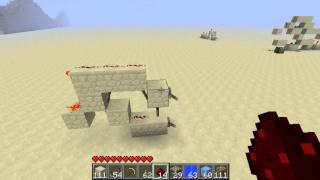
Video: Minecraft Logic Gates 10 - D-Flip-Flop [Tutorial] by Sw1Ftx16
How to build it
- Place the Input Blocks
Start by placing three solid blocks in a row on the ground to form the front input section. Leave a one-block gap behind them and place another solid block.
- Build the Raised Bridge
From that middle block, step one block up and extend a small L-shaped bridge of blocks: go two blocks out and one block across.
- Add the SR Latch Blocks
At the back of the circuit, place two blocks diagonally from each other to form the core RS NOR (SR) memory latch, plus an extra block at the end to invert the output for viewing.
- Lay the Redstone Dust
Run redstone dust along the ground paths connecting the input blocks to the back latch, and place dust on top of the first two raised bridge blocks (leaving the corner block without dust on top).
- Attach the Redstone Torches
Place redstone torches on the sides of the input blocks to act as inverters, and place two torches facing each other between the diagonal blocks at the back to complete the SR latch.
- Add the Output Torch and Controls
Place a final redstone torch on the last block to invert and display your output state. Attach a lever (Data input) and a button (Clock/Write input) to the front blocks.
How it works
This classic D Flip-Flop works by pairing two input inverters with an RS NOR Latch (also called an SR latch) at the back of the circuit:
- Data Input (Lever): The lever sets the desired state (ON or OFF), but its signal is held back by the input torches until the button is pressed.
- Write/Clock Input (Button): When the button is inactive, it powers the gating torches and keeps them locked off, preventing any changes from reaching the memory latch.
- Updating the Memory: Pressing the button briefly unpowers the gating line. Depending on whether the lever is ON or OFF, one of the two side torches turns on and sends a pulse into either the
SetorResetside of the back SR latch. - Output: The SR latch holds that state indefinitely until the button is pressed again. The final torch at the back inverts the latch signal so you can easily read the saved output.
Tips & variations
- More Compact Alternatives: Because this wiki-style design only uses redstone dust and torches, it has a large footprint. For survival builds or dense computer builds, you can create a tiny 1-wide D Flip-Flop using two Redstone Repeaters locking each other.
- Block Types: Always use opaque, solid blocks (like stone, iron, or wool) so the blocks can properly power the attached redstone torches.
- Cross-Edition Compatibility: Because this circuit relies purely on basic torch inversion and redstone dust without pistons or quasi-connectivity, the logic works reliably in both Java and Bedrock editions.