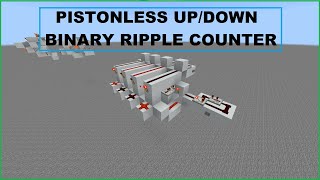
Video: Vertical Binary Up/Down Counter Tutorial - Minecraft Bedrock/Java by
How to build it
- Build the Core Locking T Flip-Flop
Start the first cell by placing a 1-tick repeater feeding into a solid block with a redstone torch or output line, and set up a perpendicular repeater to lock it. Behind the locking repeater, place a comparator set to subtract mode so it can accept inputs from the rear and sides.
- Create the Comparator Pulse Generator
Feed another subtract-mode comparator into the first comparator to act as a pulse generator. Place a 1-tick repeater running alongside it into its side input, and place a Target block behind the circuit so the incoming redstone dust redirects cleanly with equal signal strength into both paths.
- Place the Item Barrel
Place a Barrel filled with items next to the side of the first subtract-mode comparator. The comparator reads a constant signal strength from the barrel without accidentally powering adjacent redstone dust like a redstone block would.
- Add the Carry-Out Torch
Extend a block diagonally up from the output side of the T flip-flop and attach a Redstone Torch. This torch inverts the cell's state and serves as the carry signal to trigger the next cell stacked above it.
- Install the Decrement Line
Replace the redstone dust at the input of the T flip-flop with a Target block. Build a vertical zig-zag tower of Glass blocks behind it with redstone dust on top so a vertical signal can feed into both the repeater and the Target block simultaneously.
- Wire the Reset Logic
Off the side of the cell, place a block with a repeater set to 3 ticks (this exact delay is required) leading into a block with redstone dust, followed by a 1-tick repeater aiming into a solid block. This timing unlocks the T flip-flop repeater first and then pulses the cell to force its output to zero.
- Add the Vertical Reset Tower
Swap the redstone dust on the reset line with a Target block. Build a second vertical Glass block tower with redstone dust alongside it so a single reset signal can travel vertically through every stacked cell.
- Stack the Counter Cells Vertically
Duplicate the entire cell directly on top of the first one for as many binary bits as you need (the bottom cell is the least significant bit, and the top cell is the most significant bit). Ensure the redstone torch from each lower cell feeds into the input of the cell directly above it, and connect the two vertical glass towers.
- Build the Increment, Decrement, and Reset Inputs
At the bottom cell's carry-in, place a Button for the Increment input (removing any unused carry torch at the very bottom). Connect the Reset glass tower to a subtract-mode comparator pulse generator using two repeaters (set to 4 ticks and 2 ticks) triggered by a Button. Connect the Decrement glass tower to a fast 1-tick comparator pulse generator with its own Button, and attach Redstone Lamps to the cell outputs to read your binary number.
How it works
Each vertical slice of this counter is a 1-bit memory cell built around a repeater-locking T flip-flop:
- Counting Up (Increment): Pressing the increment button toggles the bottom cell (least significant bit). Each cell has an inverted output torch that acts as the carry line. When a cell transitions from
1back to0, its carry torch turns on and sends a pulse through the subtract-mode comparator pulse generator of the cell above it, causing a ripple carry up the stack. - Target Block Redirection: The subtract-mode comparator in the pulse generator requires equal signal strength at its rear and side to cut off the pulse properly. Using a
Targetblock redirects the redstone dust directly into the comparator and repeater without signal loss. - Counting Down (Decrement): Pulsing the decrement glass tower sends a 1-tick pulse into every cell simultaneously, flipping the states in reverse ripple order. Because it is a ripple counter, you will briefly see transition states on the lamps while the signal settles.
- Resetting to Zero: The reset line uses a
3-tick repeaterand a1-tick repeaterto unlock the T flip-flop while forcing its state off. Cells currently at1drop to0, while cells already at0remain at0.
Tips & variations
- Java vs. Bedrock Glass Towers: In Bedrock Edition, redstone signals can travel both up and down a glass block tower. In Java Edition, redstone signals can only travel up a transparent glass tower, so you must place your Reset and Decrement pulse generators at the very bottom of the counter.
- Faster Down Counter Variant: Because decrementing across all cells triggers extra transition states, it is slightly slower than incrementing. If you only need a fast down counter, simply place blocks and redstone torches on the output to invert the display lamps, and use the fast Increment button to count down.
- Extending Past 15 Blocks: If you stack enough bits that the vertical glass lines exceed a redstone signal strength of 15, insert a solid block and redstone torches along the tower to repeat the signal upward.
- Critical Timing: Make sure the reset line repeater is set to 3 ticks and the decrement pulse generator repeater is set to 1 tick; other delays will cause the counter to miscount.