
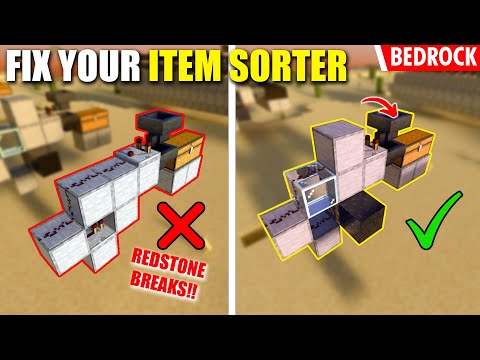
Video: 1.21 FIX Your ITEM SORTER Keeps Breaking! (OVERFLOW PROTECTION) - Minecraft Bedrock by Jaype
How to build it
- Place the Base and Piston
Start by placing two solid blocks on the ground where the back of your sorter slice will sit, using one as a temporary support. Place a solid block, a glass block, and a regular piston facing sideways along the row, then remove the temporary support block.
- Build the Upper Redstone Frame
Use a temporary block to step up and place two more solid building blocks to form the upper frame behind the glass and piston. Break the temporary block so you are left with a staggered staircase profile that incorporates the glass block.
- Lock the Piston Row with Obsidian
Place a single block of obsidian directly in front of the piston's head. If you are tiling multiple sorter slices side by side, each slice gets a piston facing the next piston in line, and you only need one obsidian block at the very end of the entire row to keep all pistons from extending.
- Wire the Redstone Torch, Comparator, and Dust
Attach a redstone torch to the side of the piston block facing toward the front (where your chests and hoppers will go). Place your redstone comparator on the top platform facing backward into the circuit, and lay three redstone dust down the glass staircase to connect the comparator output toward the torch.
- Attach the Chests and Hoppers
In front of the redstone frame, place your storage double chest. Crouch and connect a bottom hopper feeding directly into the back of the chest (this hopper sits next to the redstone torch, locking it), then place the filter hopper on top facing directly into the back of the comparator.
- Set Up the 44 Renamed Filter Items
Use an anvil to rename 44 stackable items that you will never send through the sorting system. Open the top filter hopper (the one read by the comparator), place your renamed filler items across the right four slots, and put the item you actually want to sort in the first slot on the far left.
- Optional: Retrofit an Existing Sorter
To fix an already-built traditional sorter, remove the lower repeaters and replace the solid bridge block with glass so the three redstone dust travel straight down the glass. Swap the block holding the redstone torch for a sideways piston, put the torch back on, and place one obsidian block at the end of the piston line.
How it works
Traditional item sorters without overflow protection fail when a chest and its hoppers completely fill up. As the filter hopper backs up to a full 64-stack, the comparator outputs a strong signal that bleeds sideways into adjacent slices, unlocking neighboring hoppers and draining all of their filter items.
- Signal Path: The top filter hopper is read by a
redstone comparator. Because this modified Bedrock layout removes the bottom repeater and uses aglassblock staircase, the 3redstone dustcarry the signal down without cutting off the wire or powering blocks in a way that bleeds out of control. - Torch Inversion & Hopper Lock: In its resting state (with 44 filler items and the target item sitting in the hopper), the comparator is lit up, while the
redstone torchmounted on thepistonstays ON and locks the bottom hopper beneath the filter. - Piston & Obsidian Backstop: Replacing the solid torch-mounting block with a
pistonblocked by an immovableobsidianblock at the end of the row prevents unwanted block-powering behavior in Bedrock Edition while keeping the circuit completely 1-wide tileable.
Tips & variations
- Only One Obsidian Needed: You do not need obsidian between every slice. Face all the pistons in the same direction along the row and place a single obsidian block against the final piston at the end so none of them can push.
- Always Rename Filler Items: Name 44 sacrificial items (such as dirt or cobblestone) on an anvil before putting them in the filter hopper. If an item with that exact custom name never enters your input chest, it can never accidentally stack into the four filler slots.
- Easy Survival Upgrade: You do not need to break your chests or filter hoppers to apply this fix—just swap out the rear blocks, repeaters, and torch mounts behind your storage wall.


