Video: How To Set Up A Minecart Rail Station! ▫ The Minecraft Survival Guide [Part 223] by Pixlriffs
How to build it
- Set up the cactus breaker
At the end of your station track, place a block of sand one block lower than the rail level and put a cactus on top. Make sure to leave empty air blocks horizontally adjacent to the cactus so it does not break itself.
- Install the hopper and dispenser
Dig out the floor block directly in front of the cactus and place a dispenser facing upwards one block ahead of it. Crouch and place a hopper between them feeding directly into the side of the upward-facing dispenser, then place a slab above the cactus so players cannot walk into it.
- Lay the terminal rails
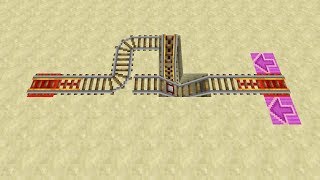
Crouch and place a regular rail on top of the hopper leading straight into the cactus. Next, place powered rails on top of the dispenser and the block ahead of it to form the departure and arrival point.
- Position the activator and detector rails
Moving along the track away from the cactus, place an activator rail right before the dispenser's powered rails. Leave a one-rail gap using a powered rail, and then place a detector rail before connecting the rest of your main powered rail line.
- Wire the one-way arrival ejector
Dig underneath the solid block supporting the detector rail and place two pieces of redstone dust leading toward the station. Run that dust into a redstone repeater feeding into a solid block, place a dot of redstone dust on top of a block next to it, and cap it with a solid block adjacent to the activator rail.
- Add the departure button and stock carts
Place a button on the wall within reach of the dispenser and the starting powered rails, then load a couple of minecarts into the dispenser. Pressing the button will dispense a cart and power the rails to launch you past the inactive activator rail.
How it works
The station handles arrivals and departures on the same single track using directional timing and rail mechanics:
- Incoming Arrival: As your minecart enters the station at full momentum, it rolls over the
detector-rail. This sends a signal through the undergroundredstone-dustandredstone-repeaterto power the block adjacent to theactivator-rail. - Player Ejection: By the time the cart reaches the powered
activator-rail, it dismounts you onto the station platform while the empty cart continues forward. - Cart Collection: The empty minecart rolls over the final
railand collides with the cactus. The cactus immediately breaks the cart into an item, which is caught by thehopperbeneath it and funneled straight into the upward-facingdispenser. - Outgoing Departure: Pressing the
buttonactivates thedispenser(placing a fresh cart onto the track above it) and powers the startingpowered-railsection. Because there is a one-rail gap between theactivator-railand thedetector-rail, you completely clear the activator rail before hitting the detector rail on your way out, preventing accidental ejection.
Tips & variations
- Keep the One-Rail Gap: Never place the detector rail directly next to the activator rail. If they touch, the detector rail will instantly power the activator rail as you leave the station and throw you out of your minecart.
- Arrival Momentum: Lead into the station with a solid stretch of powered rails (around seven powered rails are needed to reach top speed) so your cart has enough momentum to coast across the activator rail and hit the cactus.
- Main Line Powering: For the long tunnel between stations, alternate stretches of regular rails with occasional powered rails placed atop a
redstone-block. Hiding redstone blocks under the floor keeps the tunnel clean and protects your power sources from creeper explosions. - Water Protection: If building underground or under an ocean, seal all ceiling leaks first—flowing water will instantly wash away your rails and redstone dust.