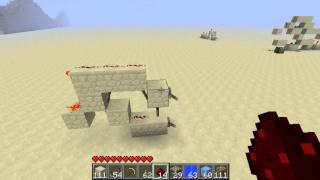
Video: Minecraft : Data Flip Flop Tutorial by xRush101
How to build it
- Place the Memory Piston
Place a sticky piston with a solid block on its face. This piston's extended or retracted state represents your saved data output.
- Set Up the Data Input
Place a solid block above the piston setup so it powers the piston through quasi-connectivity (one block diagonally or two blocks above), and attach your data input lever or redstone line to it. Because of quasi-connectivity, flipping the lever alone will not move the piston yet.
- Wire the Save / Update Line
Run a separate redstone dust line from a button (your Save/Refresh button) so that the dust passes directly adjacent to or underneath a block next to the sticky piston without powering the piston itself.
- Test Saving and Clearing Data
Turn the data lever on, then press the Save button to update the piston and lock it in the extended state. To clear the memory, turn the lever off and press the Save button again to update and retract the piston.
- Optional: Add Automatic Reset
If you want the memory to reset automatically when the input turns off, route an extra strand of redstone dust from the data input line down to the side so it directly updates the piston when the lever is switched off.
How it works
This circuit relies on two classic Java Edition mechanics: quasi-connectivity and block updates (BUD behavior).
- Data Input (Lever): The input powers the space above the sticky piston via quasi-connectivity. In this state, the piston has power available to it, or loses power, without actually realizing it because no adjacent block has updated.
- Save / Refresh Input (Button): Redstone dust updates blocks in a plus/T-formation around itself (one block out in each cardinal direction and vertically) whenever its signal strength changes. Running the button's redstone line next to or beneath the piston's neighboring block forces a block update on the piston, causing it to immediately adopt the state of the data lever.
- Auto-Reset Variant: By running a strand of redstone dust from the input line down to the side of the piston area, turning off the input lever creates an immediate block update alongside the power change, retracting the piston automatically without needing a second button press.
Tips & variations
- Using Button Inputs: If you prefer a button instead of a lever for your data input, hook the data button into a standard T Flip-Flop first, and feed that T Flip-Flop's output into the data input of this circuit.
- Java Edition Exclusive: Because this design depends entirely on piston quasi-connectivity (BUD powering), it only works in Minecraft Java Edition and will not function in Bedrock Edition.
- Avoid Accidental Updates: Keep other noisy redstone components (like unrelated dust lines or pistons) at least two blocks away from the memory piston so they do not trigger premature saves.