
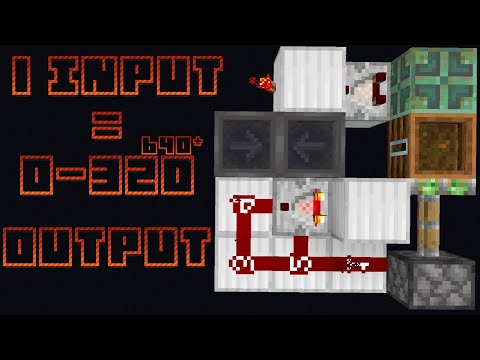
Video: Programable Pulse Multiplier Using CUD No Cooldown by mooing_cowmilk
How to build it
- Lay the Redstone Dust Base
Place four pieces of redstone dust on your support blocks in an L-shape: a line of three dust with one additional dust branching off the end.
- Place the CUD Comparator and Solid Block
Place a redstone comparator next to the dust layout facing into a solid building block.
- Install the Sticky Piston and Composter
Place a sticky piston adjacent to the solid block, and attach a composter directly to the sticky piston's head.
- Connect the Two Hoppers
Place two hoppers facing directly into each other next to the comparator setup so items can transfer back and forth between them.
- Add the Block and Redstone Torch
Crouch and place a solid block on top of the first hopper, then attach a redstone torch to the side of that solid block to lock the hopper loop.
- Place the Copper Bulb Input
Place a copper bulb with a comparator reading from it to control the hopper locking mechanism. Attach a button to the underside of the copper bulb (or wire your input into it) to keep the build within a 2-block height.
- Prime the Composter
Right-click the composter with food or seeds until it fills enough for the comparator to power itself into a CUD (budded) state.
- Program Your Pulse Count
Place your desired number of items into one of the hoppers. Each item equals one output pulse (up to 320 items for a full hopper).
How it works
This circuit relies on a Java-exclusive mechanic called a Comparator Update Detector (CUD) alongside a bidirectional hopper counter:
- Input Trigger: Pressing the button toggles the
copper bulb. Because the copper bulb acts as a compact T flip-flop, its state switches and flips which of the two hoppers is locked by the redstone comparator andredstone torch. - Bidirectional Counting: Unlike standard hopper-clock pulse multipliers that must drain back to their starting side before reuse, this design works in both directions. Once the bulb toggles, items immediately begin transferring from the unlocked hopper into the other.
- CUD Detection: The comparator reading the
composteris held in a self-powered budded state through thesticky pistonand L-shaped redstone dust. Every single time an item enters or leaves the adjacent hopper, it creates a comparator update. - Pulse Generation: Each item movement updates the CUD, causing it to briefly pulse and reset itself. Once all items reach the second hopper, the updates stop and the circuit is immediately ready for the next button press with zero cooldown.
Tips & variations
- Doubling the Output (Up to 640 Pulses): Place an
observerdirectly observing the pulsing line. Because the observer triggers on both the rising and falling edge of each pulse, it doubles the output (e.g., 16 items produce 32 pulses). Above 320 pulses, you can only generate even numbers. - Single-Pulse Observer Line: If you want to connect an observer line without doubling the pulse count, place a
redstone repeaterbefore the observer. - Java Edition Only: Comparator Update Detectors rely on update quirks specific to Minecraft Java Edition and will not function in Bedrock Edition.
- Composter Level: Make sure to fill the composter gradually until you see the comparator power itself on; too few layers won't provide enough signal strength to hold the CUD state.


