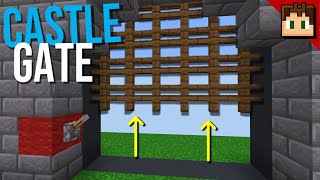
Video: Minecraft Bedrock - SIMPLE CASTLE GATE TUTORIAL (Xbox/PS4/MCPE/Windows 10/Switch) by Rogue Fox
How to build it
- Prepare the Bottom Trench
Reserve a 5x3 area for the build and dig down three blocks below your desired floor level. In the center of the pit, place a row of three solid building blocks along the back edge.
- Install the Lower Pistons
Directly in front of those three solid blocks, place a row of three sticky pistons facing upward. On top of those sticky pistons, place three regular pistons also facing upward, and top each regular piston with a gravity block (such as gravel, sand, or concrete powder) so it sits flush with the floor.
- Wire the Lower Double Extender
Run three pieces of redstone dust across the three solid blocks behind the sticky pistons. Place three observers directly on top of that redstone dust so their faces look down at the dust and their red output dots point upward, then place a solid block on top of each observer to form the floor behind the gate.
- Build the 3x3 Gate
On top of the three gravity blocks, build a 3x3 grid of iron bars or wooden fences. Temporarily power the bottom redstone line with a button to verify that the lower double piston extender pushes the entire gate up by two blocks and retracts cleanly.
- Connect the Bottom Open Buttons
On one side of the gate frame, place a solid block at floor level with a stone button on both the front and back faces to serve as the 'Open' control. Build a small staircase of three blocks stepping down from this button block to connect a line of redstone dust into the three dust behind the lower sticky pistons.
- Install the Upper Pistons
With the gate pushed into its open (raised) position, place three solid blocks directly on top of the top row of iron bars or fences. Above those blocks, build an inverted piston array facing downward: three sticky pistons at the very top with three regular pistons attached to their bottom faces, resting against the blocks above the gate.
- Wire the Upper Double Extender
Behind the upper piston stack, place a row of three observers with their faces pointing straight up toward the sky and their red output dots pointing downward toward the lower pistons. Place three solid blocks below those observers (right behind the blocks sitting on the gate), then run three redstone dust across the top faces of the three observers.
- Add the Torch Tower for the Close Buttons
Directly above your bottom button block on the side frame, place another solid block with stone buttons on both sides to serve as the 'Close' control. Build a vertical redstone torch tower on top of this block: place a redstone torch on the block, a solid block above the torch, a second redstone torch on that block, and a final solid block on top.
- Link the Torch Tower to the Upper Extender
Place two solid blocks bridging from the top of your torch tower over to the upper observer row. Run two pieces of redstone dust across these blocks so they connect into the redstone dust sitting on top of the three upper observers.
- Frame and Conceal the Redstone
Build your castle walls and walkway around the mechanism to hide the pistons and wiring. Where the side wall meets the diagonal redstone staircase going to the bottom circuit, place an upside-down or inward-facing stair block instead of a full solid block so it hides the gap from the outside without cutting off the redstone dust line.
How it works
This castle gate relies on a pair of mirrored, observer-based double piston extenders—one buried under the floor to lift the gate, and one hidden in the ceiling to push it back down.
- Opening the Gate: Pressing the bottom button sends a redstone pulse down the stepped dust line into the three blocks behind the lower sticky pistons. This immediately extends the sticky pistons, pushing the regular pistons and the gate up by one block. At the same time, the three observers detect the dust turning on (and off) and fire pulses into the solid floor blocks above them, powering the raised regular pistons to push the gravity blocks and gate up a second block.
- Gravity Block Reset: Because regular pistons cannot pull blocks back down, gravity blocks (sand, gravel, or concrete powder) are used as the floor spacer. When the lower sticky pistons and regular pistons finish their pulse cycle and retract, the gravity blocks simply fall back into their resting positions while leaving the iron bars pushed up inside the ceiling cavity.
- Closing the Gate: Pressing the top button powers the block beneath the vertical torch tower. The first redstone torch turns off, which allows the second redstone torch above it to turn on. This sends a pulse across the top redstone dust line into the upward-facing observers. Just like the bottom unit, the upper sticky pistons and regular pistons fire in sequence to push the entire gate and its top buffer blocks down two spaces, resetting the entrance.
Tips & variations
- Why the Stair Block Matters: On the side with the button wiring, a full opaque block placed directly above the descending redstone dust staircase would cut the signal line. Using a stair block gives the appearance of a solid wall from the front while remaining transparent to redstone connectivity on the back.
- Gate Materials: You can use 9 iron bars for a classic metal portcullis look, or swap them for 9 wooden or nether brick fences. Note that when the gate opens, the side bars will visually connect to the inner archway walls.
- Floor Matching: Choose your gravity block to blend in with your castle floor palette—gravel fits cobblestone and stone bricks well, sand works for sandstone builds, and any of the 16 colors of concrete powder can match custom floors.
- Bedrock Edition Timing: This specific observer double piston extender relies on Bedrock Edition piston timing and update order; it will not function the same way in Java Edition where quasi-connectivity and 1-tick block spitting apply.