
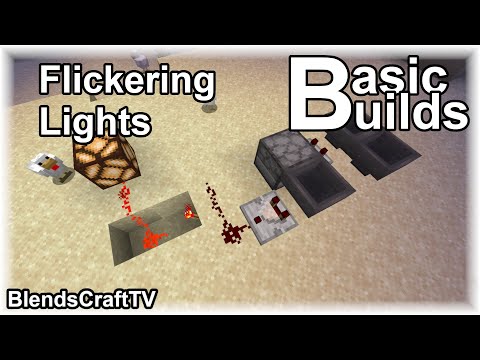
Video: Flickering Lights - Basic Builds - Minecraft Java 1.14.4 by BlendsGaming
How to build it
- Clear a 5x2 Build Area
Find a flat 5x2 space near where you want your flickering light. At one end, place two hoppers facing directly into each other so they form a continuous loop.
- Start the Hopper Clock
Drop one of your stackable items inside one of the two hoppers. The item will immediately begin transferring back and forth between them.
- Place the First Comparator
Place a Redstone Comparator facing outward from one of the clock hoppers to detect the item moving back and forth.
- Add the Dropper and Return Hopper
Place a Dropper directly in front of the comparator, facing the next tile over. Crouch and place your third hopper directly in front of the dropper, facing back into the dropper so any ejected item gets returned.
- Read the Return Hopper
Place your second Redstone Comparator reading from the return hopper (the one feeding back into the dropper) and run two pieces of Redstone Dust out from that comparator's output.
- Place the Redstone Torch Output
Dig out a small two-block trench at the end of the two Redstone Dust lines and attach a Redstone Torch to the side of the block carrying the final dust. The dust will invert this torch whenever a strong signal passes through.
- Load the Randomizer Items
Open the dropper and insert your remaining three different stackable items along with your one non-stackable item (such as a stone sword).
- Connect the Redstone Lamp
Place your Redstone Lamp adjacent to the Redstone Torch (or run extra redstone dust from the torch output to your ceiling or wall lamp). Watch as the lamp randomly flickers on and off.
How it works
This circuit combines a 2-hopper clock with a dropper-hopper randomizer:
- Hopper Clock: The first two hoppers pass a single stackable item back and forth indefinitely. Each time the item enters the hopper with the first comparator, it emits a brief pulse.
- Randomizer: That pulse triggers the dropper, which chooses one of its four occupied slots at random and pushes that item into the third hopper before it flows back into the dropper.
- Signal Strength Logic: When the dropper ejects one of the three stackable items (which stack to 64), the second comparator only outputs a signal strength of
1. This weak signal only powers the first Redstone Dust and does not reach the block holding the Redstone Torch, leaving the torch and lamp ON. - The Flicker: When the dropper randomly picks the non-stackable item (like a sword), the comparator outputs a signal strength of
3. This reaches the second piece of Redstone Dust, powering the block and turning OFF the Redstone Torch and Redstone Lamp until the next clock cycle.
Tips & variations
- Use 3 Distinct Stackable Items: In the dropper, make sure the three stackable items do not stack with each other, or they will merge into one slot and alter the odds of the flicker.
- Adjusting Flicker Frequency: You can change how often the light stays on or turns off by adding or removing different stackable items in the dropper (up to 9 slots total). More stackable items mean the light stays on longer between flickers.
- Connecting Multiple Lamps: Simply run a line of redstone dust from the Redstone Torch to multiple Redstone Lamps if you want a whole hallway to flicker together, or build separate small units for independent flickering.
- Common Mistake: Make sure you use a Dropper and not a Dispenser, otherwise non-stackable items like armor, buckets, or projectiles might be equipped or fired instead of transferred quietly into the hopper.


