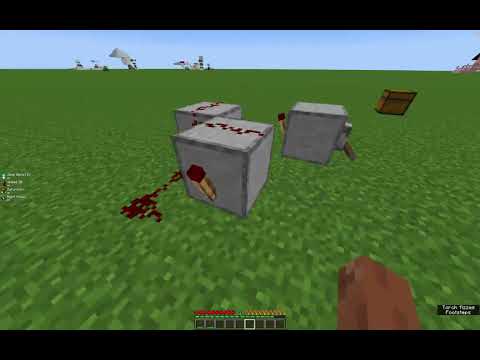
Video: SUPER EASY REDSTONE CLOCK WITH NO REPEATERS by AwesomeSauceSky
How to build it
- Place the 3 Building Blocks
Place your three solid building blocks on the ground in a small V-shape (or triangle pattern with a gap in the center) so that each block is diagonal to the others.
- Attach the Shut-Off Lever
Place your lever on one of the building blocks and flick it down to the ON position if you want to keep the clock paused while you finish building, or use it later to toggle the clock.
- Place the First Redstone Torch
Attach your first redstone torch to the side of the lead block so it faces into the wiring area.
- Lay Down the 6 Redstone Dust
Place three redstone dust on the ground and across the blocks on one side, then place the remaining three redstone dust connecting the other side and the center so all three blocks are linked to the torch output.
- Add the Remaining 2 Redstone Torches
Place your second redstone torch on the side of the next block (it may flicker and burn out briefly, which is normal), then place the third redstone torch on the final block to keep the rapid cycle running continuously.
- Connect Your Output Device
Run a line of extra redstone dust out from any part of the clock to power your mechanism, such as a door that opens and closes rapidly.
How it works
This circuit works as a rapid torch burnout clock:
- When a redstone torch powers the redstone dust in the loop, that dust feeds power right back into the solid building blocks holding the torches.
- Whenever a block holding a redstone torch becomes powered, the torch attached to it turns OFF after 1 redstone tick.
- As soon as the torches turn off, the redstone dust loses power, unpowering the blocks and allowing the torches to turn back ON.
- Using three torches shares the feedback cycle across the three blocks so that even if a single torch temporarily burns out from pulsing too quickly, the remaining torches keep updating the circuit and sustain a frantic, ultra-fast pulse.
- Flipping the lever ON locks one of the blocks in a powered state, stopping the entire clock whenever you want it quiet.
Tips & variations
- No Adjustment: Unlike repeater clocks, you cannot adjust the tick delay on this clock—it always runs at maximum speed.
- Redstone Lamps Won't Flicker: Because the pulse is so fast (faster than the 2-redstone-tick turn-off delay of a redstone lamp), connected lamps will stay permanently lit instead of blinking.
- Best Outputs: Connect this clock to wooden doors, trapdoors, droppers, dispensers, or pistons that can react to rapid 1-tick pulses.