Video: TINY Infinite Minecart Booster - Tiny & Working!!! - Redstone Tutorial by NiclasBlocko's Minecraft
How to build it
- Orient Your Build East or West
Before placing any blocks, check your coordinates or sun direction so that your launching track faces either East or West. Due to directional minecart physics, launching North or South causes the stacked minecarts to separate.
- Create the Locked Hopper Clock
Place a solid block with a wooden button on one side and a redstone torch on the opposite side. Next to the torch, place two hoppers facing directly into each other so the torch locks the adjacent hopper.
- Add the Comparator and Item
Place a redstone comparator reading out from the hopper that is not directly locked by the torch. Drop a single random item (such as dirt or rotten flesh) inside the locked hopper.
- Wire the Upward Dispenser
Place a solid block in front of the comparator and put a piece of redstone dust on top or beside it to carry the output signal. Place a dispenser facing straight upwards next to this redstone dust so the comparator pulse powers it.
- Add the Return Hopper and Starting Rails
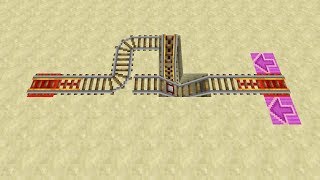
Crouch and attach a third hopper pointing into the side of the upward-facing dispenser. Place a powered rail directly on top of the dispenser and another powered rail on top of the attached return hopper.
- Extend and Power the Launch Track
Step down the track by one block after the dispenser and place one or two more powered rails before connecting to your main line of regular rails. Power the rails from the lowest powered rail at the front so your power source does not interfere with the dispenser.
- Install the Cactus Return System
Behind the return hopper at the back of the station, place a block of sand with a cactus on top so incoming carts hit the cactus, break, and get collected by the hopper back into the dispenser. Place a glass block above the cactus to stop it from growing and dropping items into the hopper.
- Load the Minecarts and Launch
Put at least two minecarts into the dispenser (or drop them against the cactus so the hopper loads them). Press the wooden button to dispense two stacked carts, hop in, and hold forward (W) to launch down the track.
How it works
This station relies on a hopper double-pulser combined with Minecraft's stacked minecart collision physics:
- Hopper Double-Pulser: Normally, the redstone torch locks one of the two mutually facing hoppers, trapping the single item inside. Pressing the wooden button turns off the redstone torch for 15 redstone ticks (1.5 seconds).
- Comparator Pulse Train: While the torch is off, the single item transfers back and forth between the two hoppers several times. Each time the item enters the monitored hopper, the
redstone-comparatorflashes on and powers thedispenser. Because the hopper clock cycles quickly, the dispenser registers two pulses during the button press and fires two minecarts upward onto the rail. - Infinite Self-Boosting: When two minecarts occupy the exact same block on a rail, their hitboxes collide and push against each other. Once nudged forward on the initial 3–4
powered-railblocks by holding the forward key (W), they continuously accelerate each other along standard unpowered rails—even up steep inclines—at the maximum 8 m/s rail speed. - Automatic Reset: Returning to the station drives the stacked carts into the cactus at the back, breaking them so the return
hopperfeeds both minecarts straight back into the dispenser.
Tips & variations
- East/West Orientation is Mandatory: Only build the launcher facing East or West. If you build it facing North or South, the two minecarts tend to drift apart after launching and lose their infinite boost. You can curve the track North or South after the initial launch.
- Use a Wooden Button: A wooden button stays pressed longer than a stone button, giving the hopper clock the exact window needed for the dispenser to fire twice.
- Isolate Rail Power: Power your starting powered rails from the bottom of the slope away from the dispenser. Placing a redstone torch or lever too close to the dispenser will lock it in a powered state and prevent it from dispensing carts.
- Block Cactus Growth: Always keep a block (like glass or string) directly above the cactus, and leave the four horizontal sides adjacent to the cactus empty so the cactus doesn't break itself or drop cactus items into your minecart hopper.