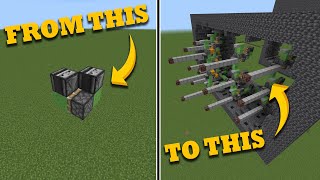
Video: Flying Machine Minecraft 26.1 in 2 Minutes | How to Make a 2-way Slime Block Flying Machine by Dusty Dude
How to build it
- Place the Core Slime Blocks
Suspend two slime blocks in the air off the ground so they don't stick to the floor. Place them side-by-side or diagonally offset depending on your piston configuration so each half can slide past the other.
- Attach the Sticky Pistons
Place two sticky pistons facing inward into the slime blocks from opposite directions. Each piston should push one slime block and be stuck to the side of the other slime block.
- Add Harvesting Arms (Optional)
If you are using this for a crop farm, attach extra slime blocks extending outward like wings or a cross to sweep through your crops. Make sure each half of the machine has at most 10 slime blocks so the total pushed load stays within the 12-block piston push limit.
- Mount the Engine Observers
Place one observer on top of each main slime block with its face pointing straight up and its red output dot pointing down into the slime block.
- Test Manual Movement
To test the machine manually, place any block on top of one of the upward-facing observers. The machine will travel in the direction that the corresponding piston pushes.
- Position the Return Station Stopper
At the destination point, place a stationary observer facing the exact spot where the flying machine's leading observer will collide with it. Place an immovable block, such as a furnace, directly behind this stationary observer so the machine cannot push it.
- Wire the Return Trigger
Crouch and place a solid block behind the stationary observer (on top of the furnace). Place a redstone repeater on top of the stationary observer facing forward toward the flying machine, and set the repeater to 2 or 4 ticks.
- Add the Activation Trapdoor
Attach a trapdoor to the front of the repeater's level so that it sits directly above the spot where the flying machine's observer stops. When powered, this trapdoor will flip and trigger the observer beneath it.
- Build the Second Return Station & On/Off Switch
Build an identical return station at the opposite end of the track. Place a lever on the side of one of the furnaces; flipping it on will lock the return mechanism and park the flying machine when it docks.
How it works
This contraption relies on the 12-block piston push limit and the ability of slime blocks to conduct a redstone signal while sticking to adjacent blocks.
- Propulsion Cycle: When an upward-facing observer detects a block change above it, it sends a 1-tick redstone pulse down into the slime block beneath it. Because slime blocks are solid opaque conductors, that slime block strongly powers the adjacent sticky piston.
- Push and Pull: The powered sticky piston extends, pushing the opposite half of the machine forward by one block. When the pulse ends, the piston retracts; because it is a sticky piston, it pulls the trailing slime block, observer, and opposite piston along with it.
- Chain Reaction: Moving the second observer one block forward causes it to detect a movement update, firing a pulse into its own slime block and piston, repeating the cycle endlessly.
- Return Station: When the machine hits the stationary observer, the furnace prevents further movement. The stationary observer detects the arriving flying machine and sends a signal into the solid block behind it, powering the repeater on top. After a short delay (2 or 4 ticks to let the flying machine settle), the repeater flips the trapdoor directly above the flying machine's rear observer, sending the machine back the way it came.
Tips & variations
- Honey Block Alternative: You can swap slime blocks for honey blocks, which is helpful if you don't want the machine sticking to adjacent slime structures. However, honey blocks are transparent and do not conduct redstone signals. If you use honey blocks, you must reposition the observers so their output points directly into the pistons rather than through the honey block.
- Mind the Push Limit: A piston can push at most 12 blocks at once. Because each side of the engine already pushes an observer and the opposite piston assembly, keep your total slime block count to 10 or fewer per side.
- Cheap Immovable Blocks: You don't need expensive obsidian for the return stations—standard furnaces are blast-resistant in terms of piston movement and cannot be pushed by slime blocks.
- Edition Note: Because standard sticky pistons in Bedrock Edition do not drop their block on a 1-tick pulse, two-way flying machines built with two sticky pistons and upward observers are designed for Java Edition.