
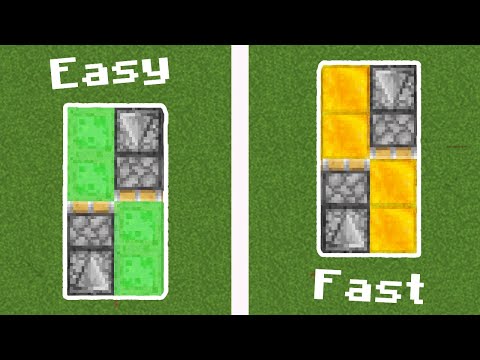
Video: How to Make Flying Machine in Minecraft! (Java/Bedrock Edition) by CowCapz
How to build it
- Build off the ground
Pillar up a few blocks into the air so your honey or slime blocks will not touch and stick to the ground.
- Place the first observer and sticky piston
Place an observer at the top of your temporary pillar, then break the pillar beneath it. Attach a sticky piston directly against the red output dot on the back of the observer.
- Add the first pair of honey or slime blocks
Place two honey blocks (or slime blocks) in a line extending forward from the sticky face of the piston, running alongside the observer.
- Add the opposing honey or slime blocks
On the other side, place another line of two honey or slime blocks parallel to the first pair so they connect at the middle.
- Install the second observer and piston
Place a second observer on the outer end of the new block line with its red output dot facing inward toward the machine. Place a sticky piston (Java Edition) or a regular piston (Bedrock Edition) against that red dot, facing inward.
- Start and stop the flying machine
Place any block or flick a trapdoor in front of an observer's face to trigger the machine and fly in the opposite direction. To stop it, build an obsidian pillar directly in its flight path.
How it works
The flying machine moves through a continuous chain reaction of block updates and piston pushes:
- Initial Trigger: Placing a block in front of the rear
observercauses it to send a 1-tick redstone pulse from its red output dot into the attachedpiston. - Push Phase: That piston extends, pushing the opposite pair of
honey blocks(orslime blocks) along with the front observer and front sticky piston one block forward. - Pull Phase: Because the front observer was just moved, it detects a change in position and fires a pulse into the front
sticky piston. In Java Edition, the 1-tick pulse causes the sticky piston to spit out its blocks on the push and pull the rear half of the machine forward on the next update, creating an endless loop until blocked by immovableobsidian.
Tips & variations
- Java vs. Bedrock Edition: In Java Edition, use two sticky pistons so the machine can travel in either direction depending on which observer you trigger. In Bedrock Edition, sticky pistons do not drop their blocks on a 1-tick pulse, so using two sticky pistons will cause the machine to bounce back and forth in place. To fix this on Bedrock, replace the rear sticky piston with a regular piston (to change direction later, you must swap the pistons around).
- Honey vs. Slime Blocks: Honey blocks are much better for carrying players in Java Edition because your character sticks to the top of honey while moving, whereas slime blocks require you to walk along to avoid falling off.
- Two-Way Docking Station (Java): Place an obsidian stop block at both ends of the track with a trapdoor in front of where the observer lands; flipping the trapdoor updates the observer and sends the machine back the other way.


