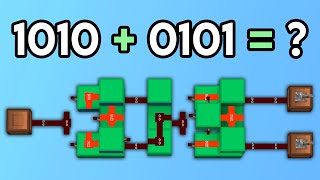
Video: Synced Addition | Logical Redstone #9 by mattbatwings
How to build it
- Build the First Input XOR Gate
Start your first layer by building a standard comparator XOR gate. Place two comparators set to subtract mode, wire them symmetrically with redstone dust so each side subtracts from the other, and merge their front outputs into a solid block with redstone dust.
- Add the A and B Inputs
Behind the two inputs of your XOR gate, place two redstone repeaters fed by two redstone lamps. Attach a lever to the back of each lamp; these will serve as your A and B bit inputs for this layer.
- Wire the Cancel Signal Tower
Place a target block next to the input dust before the XOR gate and attach a redstone torch to it so the torch only stays on when both inputs are 0. Run that torch into a repeater leading onto a two-slab vertical tower arrangement with dust on top, feeding directly into the side of a subtract-mode comparator.
- Wire the Generate Signal Tower
To generate a carry signal, invert the output of your first XOR gate using a block and a redstone torch. Run this torch onto another two-slab vertical dust tower feeding straight into the back of the subtract-mode comparator you placed in the previous step.
- Add the Output XOR Gate
Run the front of the carry comparator into a solid block, place redstone dust next to it, and feed that dust into a repeater. Build a second subtract-mode comparator XOR gate in front of this repeater and lead its final output into a redstone lamp to display the sum bit.
- Connect the Diagonal XOR Line
Take the output from the first input XOR gate and run it through a repeater into two pieces of redstone dust. Invert this line twice with redstone torches so the final torch matches the first XOR output and routes into the second XOR gate of the layer below.
- Stack the Layer 8 Times Vertically
Place two extra guide slabs underneath your generate and cancel towers so the vertical dust connects cleanly when stacked. Copy the entire completed layer and stack it upward every 2 blocks until you have 8 total vertical layers (in Creative with WorldEdit, use //copy and //paste -a two blocks up).
- Adjust the Top Carry-Out Output
On the very top of the 8th layer, the final output XOR gate only receives one input from the carry tower. Remove the unused half of that top XOR gate and replace it with an extra repeater so the final carry-out lamp stays synchronized at exactly 5 ticks.
- Wire the Bottom Carry-In Input
At the very bottom layer, expand the lone lowest output path into a full subtract-mode comparator XOR gate. Replace the lowest two generate slabs with a solid block, redstone dust, and a double-torch inverter wired to a lamp and lever so toggling Carry-In powers both the bottom comparator and the generate slab tower.
How it works
Unlike a ripple-carry adder that passes carries sequentially from bit to bit, the Carry-Cancel Adder (invented by MagicalGentleman) pre-computes every carry simultaneously using signal strength down vertical slab towers:
- First XOR Stage: Each layer takes inputs
AandBand passes them through a subtract-mode comparator XOR gate. Because of the symmetrical dust layout, one active input compares signal strength 13 against 11 (outputting 2), while two active inputs compare 14 against 14 (outputting 0). - Generate & Cancel Towers: A carry starts whenever a bit pair is
1 + 1(Generate) and stops whenever a higher bit pair is0 + 0(Cancel). By running the Generate tower into the rear of a column of subtract comparators and the Cancel tower into their sides, any Cancel signal at the same or higher level has equal or greater signal strength than the Generate signal, subtracting it down to zero for all higher bits. - Clever XNOR Shortcut: Instead of building a separate AND gate to detect
1 + 1, the circuit simply inverts the first XOR gate (creating an XNOR). While an XNOR also turns on during0 + 0, the target-block NOR gate fires a Cancel signal at the exact same time, overriding the false Generate. - Diagonal Sum XOR: The pre-computed carry from each layer's comparator is fed into a second XOR gate alongside the first XOR output from the adjacent layer, producing all output sum bits after an identical 5-tick delay.
Tips & variations
- Always Use Paste Without Air: If you are stacking the 8 layers using WorldEdit, make sure to use
//paste -ashifted 2 blocks up each time so air blocks in your selection do not delete overlapping vertical slab connections. - Make a Backup Slice First: Before stacking layers on top of each other, copy a single finished slice 10 blocks away as a backup in case an alignment mistake breaks the slab towers.
- Vertical Input Layout: Remember that inputs on a CCA are arranged vertically—the bottom layer represents bit 1, the second layer is 2, the third is 4, and so on up to 128 on the 8th layer.