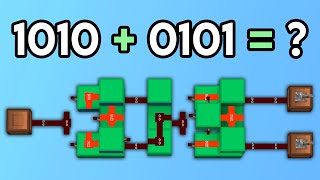
Video: Computational Redstone Build tutorial: Ripple Carry Adders by Lysus
How to build it
- Build the First XOR Gate
Place your two input blocks with levers (inputs A and B) and attach a redstone torch to the back of each. Run redstone dust from these torches to a central block holding a third torch (creating an AND gate), then place two output torches that are normally kept off by the initial input torches and the central AND torch.
- Tap the First Carry AND Gate
Extend a block upwards near the central AND torch of your XOR gate and place redstone dust and a torch on it. This pulls an independent AND output directly from the first gate, which acts as the carry-out for the first half adder.
- Route the Sum Line
Connect the two output torches of the first XOR gate together using blocks and redstone dust. Bring this line forward in a short zig-zag shape so that your second half adder will line up symmetrically with the first.
- Build the Second Half Adder
At the end of the sum line, build a second torch-based XOR gate using the exact same layout as the first. One input of this gate receives the sum line from the first half adder, while the other input will receive the Carry-In line.
- Reverse the Second AND Gate
Add the upper AND gate to the second XOR gate just like before, but orient its output torch facing backward toward the first half adder. This lines up the carry outputs of both half adders so they can be easily merged.
- Connect the Carry OR Line
Connect the outputs of both AND gates together with a single line of redstone dust to form an OR gate. Route this combined carry line down to the side so it feeds directly into the second input of the next bit's second half adder, and place a solid block to cut off any unwanted dust connections.
- Stack the Adder Cells
Each full adder cell is 4 blocks wide. Build or clone three more identical cells directly alongside the first one (spaced 4 blocks apart) so the Carry-Out line of each cell connects seamlessly into the Carry-In of the cell next to it, forming a 4-bit adder.
- Attach Output Indicators
Extend the final sum outputs from the end of each second half adder and the final carry-out from the last bit. Place iron trapdoors or redstone lamps at the end of each output line to display your binary result.
How it works
Every single-bit full adder cell in this Ripple Carry Adder is made of two half adders, each containing an XOR gate for addition and an AND gate for carry detection:
- First Half Adder (Generate): Takes the two primary bit inputs (
AandB). If only one lever is flicked, its input torch turns off, allowing one of the XOR output torches to turn on and power the intermediate sum line. If bothAandBare on (1 + 1), the central AND torch turns on, keeping both XOR output torches off (sum =0) while powering the upper AND gate to generate a Carry-Out signal. - Second Half Adder (Propagate): Compares the intermediate sum from the first half adder with the
Carry-Infrom the previous bit. Its XOR output gives the final sum for that bit position. If both the first sum and theCarry-Inare high, its backward-facing AND gate turns on to propagate the carry forward. - The Ripple Effect: An OR line merges the generated carry from the first half adder and the propagated carry from the second. Because each bit must wait for the previous bit's second half adder to finish computing before it can propagate a carry into the next slice, the carry signal cascades down the line one bit at a time—creating the signature "ripple" effect.
Tips & variations
- Color-Code Your Logic: Build each section out of different colored concrete (for example, separate colors for the XOR gates, sum lines, and carry lines) to easily troubleshoot wiring mistakes.
- Use Iron Trapdoors for Testing: Standard redstone lamps work fine for reading numbers, but they take 2 game ticks (1 redstone tick) to turn off. Using iron trapdoors (especially with a computational texture pack) lets you see exact signal synchronization because trapdoors open and close instantly on both the rising and falling edges.
- Symmetrical Alignment: While you can offset the second half adder by a block, keeping the second XOR gate lined up with the first via the zig-zag sum connector ensures the 4-wide carry line tiles cleanly without manual adjustments.