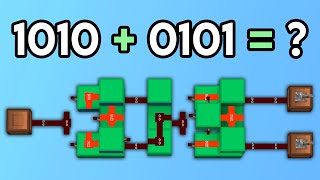
Video: Minecraft Compact Full Adder [Tutorial] by Sw1Ftx16
How to build it
- Build the First XOR Base
Place three solid blocks spaced one block apart from each other. At the back end of the layout, add two more blocks extending outward like legs.
- Add the Input Torches and Dust
Attach redstone torches to the initial input blocks and place redstone dust in the center space between them. Place solid blocks directly above those torches and run redstone dust across the top.
- Extend the Middle Frame
Extend the center line of blocks forward by three blocks. Place blocks above the redstone line in an arch or bell shape to cut off unwanted vertical dust connections, then break the temporary support block underneath.
- Wire the First Logic Stage
Place redstone torches on the top blocks and on the two inner sides of the frame. Connect these side torches together with a line of redstone dust.
- Build the Second Stage for Carry In
Place solid blocks directly above the previous torches, which should power them off. Add a central block ahead of them with torches on the inside faces, and link the path with redstone dust to create the Sum output.
- Construct the Carry Out Line
Branch off the side of the circuit with a small step of blocks to separate the Carry In input from the Carry Out path. Run redstone dust along these side blocks to link both stages of the adder.
- Place Final Inverting Torches and Levers
Place the final two redstone torches on the side carry blocks so the Carry Out logic functions properly. Attach levers to Input A, Input B, and the Carry In line to test your binary addition.
How it works
A full adder works by combining two half-adders (built around XOR and AND gates) to calculate binary addition across three inputs: A, B, and Carry In (Cin).
- First Stage (A + B): The front section acts as an XOR gate for inputs A and B. If only one input is active (1 + 0), the middle torch line outputs a signal of 1. If both A and B are active (1 + 1), both side torches turn off and the preliminary carry torch activates instead.
- Second Stage (Adding Carry In): The result of the first XOR gate feeds into a second XOR gate alongside the
Carry Inline. If the total number of active inputs is odd (1 or 3), the final Sum output turns on (representing 1 in the ones column). - Carry Out (Cout): If any two—or all three—inputs are powered at the same time, the side torches invert the signal and power the Carry Out line (representing 2 in binary). This Carry Out line can be wired directly into the Carry In of an adjacent full adder to add multi-bit numbers.
Tips & variations
- Don't Forget the Final Torches: A very common mistake on this layout is forgetting the last two torches on the upper carry blocks, which prevents the Carry Out line from triggering when
AandBare both on. - Cutting Redstone Connections: Use solid opaque blocks (like wool, concrete, or stone) above dust lines to prevent adjacent wires from linking together. Transparent blocks like glass or slabs will not cut redstone dust lines.
- Chaining Adders: To build a 4-bit or 8-bit calculator, build several of these units side-by-side and wire the Carry Out of each bit into the Carry In of the next unit.
- Silent Operation: Because this design relies strictly on redstone torches and dust without pistons, it is completely silent and works consistently across Java Edition versions.