
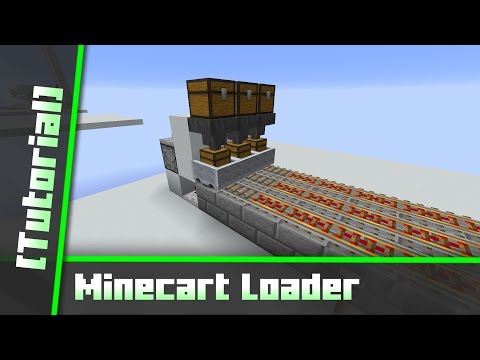
Video: Tileable Minecart Loading/Unloading Station [Tutorial] by sZPeddy
How to build it
- Set Up the Loader Track and Repeater
Place your incoming rail line leading to the loading station, ending with an unpowered Powered Rail against a solid block. Behind the block underneath that end rail, place a Redstone Repeater pointing into the block and set it to a 3-tick delay.
- Place the Downward Observer
Position yourself below the repeater and place an Observer facing downwards (so its face looks up and its output points down) directly behind the repeater, with a solid block underneath the observer to pass the signal into the repeater.
- Add the Loader Comparator and Hopper
On top of the observer, place a solid block and put a Redstone Comparator on it facing toward the observer's face. Place a Hopper behind the comparator pointing down into the Powered Rail where the minecart will sit, and top the hopper with your input Chest.
- Connect the Track to the Unloader
Extend the rail line from the loading station over to your desired unloading destination, making sure to power the rails along the center travel path so the minecart can make the trip.
- Set Up the Unloader Storage
At the unloading station end, place an output Chest with a Hopper feeding into it. Place a Powered Rail on top of this hopper and a solid block behind the rail to act as a bumper stop.
- Wire the Unloader Comparator and Torch
Place a Redstone Comparator reading from the unloader hopper, pointing away from the track into a solid block. Attach a Redstone Torch to the side or top of that block so the comparator turns the torch off whenever items flow through the hopper.
- Connect the Unloader Repeater and Test
Run a Redstone Repeater from the redstone torch signal back into a solid block powering the unloader's Powered Rail. Place your storage minecart on the track and put items in the loader chest to start the automated delivery cycle.
How it works
Both stations use dustless 1-wide logic so neighboring slices never interfere with one another:
- Loading Station: The comparator monitors the loading hopper. When items first enter the hopper—or when the final item leaves the hopper into the minecart—the comparator changes state. The downward-facing observer detects this state change and sends a brief pulse through the solid block and 3-tick repeater to briefly power the rail. If the cart is present and the hopper just finished emptying, the pulse launches the cart toward the unloader.
- Unloading Station: Normally, the unloading hopper is empty, so the comparator stays off, the redstone torch stays lit, and the repeater keeps the end Powered Rail active. As soon as a minecart with items arrives, the hopper pulls items in, turning on the comparator. This inverts the redstone torch (turning it off), which depowers the repeater and the rail, holding the minecart in place until every item has drained out.
Tips & variations
- Completely Tileable: Since neither the loader nor the unloader uses redstone dust, you can build as many of these stations right next to each other as you need. Remember to alternate regular Chests and Trapped Chests (or use barrels in newer versions) if placing chests directly side by side.
- Initial Cycle: When you first put items into the loader chest while a cart is away or just starting, the observer detects the comparator turning on and sends the cart over. Once the cart returns while items are still flowing through the hopper, it will wait on the unpowered rail until the hopper completely empties and triggers the observer a second time.


