
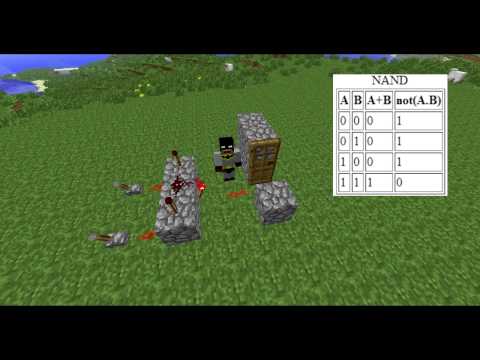
Video: Minecraft: Redstone Mini-Series - NAND Gate by ExtensionCoders
How to build it
- Place the Base Blocks
Place three solid building blocks in a horizontal row on the ground to form the foundation of the logic gate.
- Add the Input Torches
Place one redstone torch on the top of the left block and another redstone torch on the top of the right block, leaving the center block empty.
- Connect the Center Redstone Dust
Place a piece of redstone dust on top of the middle block between the two torches. Unlike an AND gate, you do not place an inverting torch on the front of the center block.
- Attach the Input Levers
Place two levers on the input side of the outer blocks (or connect them via short redstone dust lines) so that each lever powers one of the blocks holding a redstone torch.
- Wire the Output Door
Run a trail of redstone dust from the center block directly to your door. The door will start in the open position while both levers are off.
How it works
The NAND (Not-AND) gate operates by taking the standard AND gate design and removing the final inverting redstone torch, replacing that connection directly with redstone dust.
- Inputs OFF (0, 0): Neither outer block is powered, so both redstone torches on top remain lit. They both power the center redstone dust, keeping the output line active and the door open.
- One Input ON (1, 0 or 0, 1): Flipping one lever powers its corresponding block and turns off the torch on top of it. However, the other torch remains lit and continues powering the center redstone dust, so the door stays open.
- Both Inputs ON (1, 1): When both levers are switched on, both outer blocks become powered, which extinguishes both redstone torches simultaneously. With no power reaching the center redstone dust, the output signal turns off and the door closes.
Tips & variations
- AND Gate Conversion: If you already have an AND gate built, simply break the output redstone torch on the side of the center block and run redstone dust straight from the center block instead.
- Common Mistake: Make sure your input levers directly power the blocks directly underneath the two redstone torches; otherwise, the torches will never turn off when you flip the switches.
- Compatibility: Because this circuit only uses basic redstone dust and torch inversion, it works reliably across all versions of Minecraft.


